⚡ Quick Answer
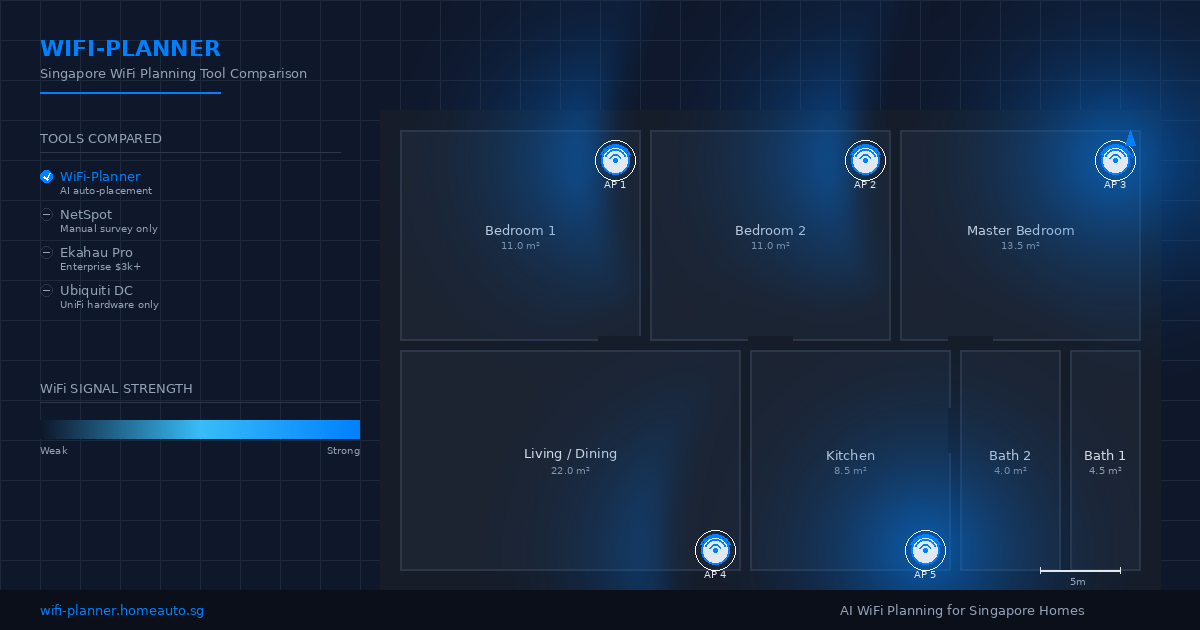
For Singapore homeowners planning WiFi before renovation, WiFi-Planner is a free browser-based tool that uploads your floor plan and uses AI to auto-place access points with a coverage heatmap, while NetSpot is a paid survey tool that requires you to walk around measuring signal, Ekahau is enterprise software at SGD $3,000+/seat, and Ubiquiti Design Center is free but tied to UniFi hardware only. Choose WiFi-Planner when you want a no-account, hardware-agnostic plan in 30 seconds; choose NetSpot when you need post-install verification with a real survey; choose Ekahau only for hospital-grade / warehouse rollouts.
Contents
- Who this guide is for
- Side-by-side comparison table
- What NetSpot does best (and where it falls short)
- What Ekahau does best (and why it's overkill for homes)
- What Ubiquiti Design Center does best (and its hardware lock-in)
- What DIY mesh buying does best (and why it's the default)
- What WiFi-Planner does best (and where it doesn't compete)
- Decision guide: who should you use?
- Frequently asked questions
Who this guide is for
You're a Singapore homeowner (or SME owner) planning a renovation, a new home network, or a mesh upgrade. You've experienced — or want to avoid — the classic problems:
- WiFi dead zones in the bedroom furthest from the router
- Buffering on the work-from-home Zoom call when someone turns on the microwave
- A landed house where one router simply cannot cover three floors
- Buying an expensive mesh system and finding it still doesn't reach the garden
You're comparing:
- WiFi-Planner — a free, no-signup, browser-based AI planner built for Singapore floor plans
- NetSpot — a desktop app that does both planning and post-install surveying
- Ekahau (formerly AirMagnet Survey Pro) — enterprise-grade WiFi planning for hospitals, warehouses, and large campuses
- Ubiquiti Design Center — free planning tool, but only for UniFi hardware
- DIY: just buy mesh — Google Nest Wifi / Asus ZenWiFi / TP-Link Deco, no planning step at all
This guide breaks down what each does, what each costs (free vs paid), and what each actually tells you about coverage in a Singapore HDB / condo / landed home.
Side-by-side comparison table
| Capability | WiFi-Planner (browser) | NetSpot (desktop) | Ekahau Pro (enterprise) | Ubiquiti Design Center | DIY mesh (no planner) |
|---|---|---|---|---|---|
| Platform | Browser (any device) | macOS / Windows desktop app | Windows desktop app + cloud | Browser (UniFi portal) | n/a — you buy hardware |
| Planning model | Predictive (AI from floor plan) | Predictive + survey-based | Survey-based (gold standard) | Predictive (UniFi AP library) | None — plug-and-pray |
| Floor plan upload | ✅ PNG, JPG, PDF | ✅ Manual room drawing | ✅ Manual room drawing + CAD import | ✅ Manual room drawing | ❌ |
| AI auto-detects walls | ✅ Yes | ❌ Manual | ❌ Manual | ❌ Manual | ❌ |
| AP placement suggestion | ✅ Hardware-agnostic, Singapore-priced | ✅ Yes, any vendor | ✅ Yes, any vendor | ⚠️ UniFi APs only | ❌ |
| Coverage heatmap | ✅ Yes — colour-coded signal strength | ✅ Yes — based on your measurements | ✅ Yes — most accurate in the industry | ✅ Yes | ❌ |
| Hardware recommendations | ✅ Singapore pricing (Aruba, Ubiquiti, TP-Link from Lazada/Shopee) | ⚠️ Generic global pricing | ⚠️ Enterprise vendor catalog | ❌ UniFi-only catalog | n/a |
| On-site survey walk | ❌ No | ✅ Yes (paid Pro / Enterprise) | ✅ Yes (mandatory) | ❌ No | ❌ |
| Hardware lock-in | None | None | None | UniFi only | Whatever you buy |
| Cost | Free (100%) | Free basic / ~S$499 Pro / ~S$1,499 Enterprise | ~S$3,000–S$10,000+ per year / perpetual licence | Free (UniFi account) | S$200–S$1,200 hardware |
| Setup time | 30 seconds | 1–2 hours | 4–8 hours (with survey) | 30–60 min | n/a |
| Skill required | None | Intermediate | Professional WiFi engineer | Intermediate | None |
| Best for | Homeowners planning WiFi before renovation / install | Post-install verification, small office | Hospitals, warehouses, campuses, large hotels | Existing UniFi shops wanting to scale | Buyers who don't care about optimisation |
What NetSpot does best (and where it falls short)
NetSpot is the closest direct competitor to WiFi-Planner. It started as a free macOS WiFi scanner and grew into a paid survey + planning suite. Many networking enthusiasts and small-office IT admins swear by it.
It does well
- Post-install survey — you walk around with your laptop and it records the actual signal at each point, generating a real (not predictive) heatmap
- Multi-floor visualisations — drop plans for each floor and see how coverage stacks
- Cross-platform — now runs on both macOS and Windows
- Free tier — passive scanning, basic visualisation
Where it falls short for a Singapore homeowner
- Manual room drawing — you have to sketch each room, set wall materials, draw windows, and position APs yourself. There is no AI floor-plan detection.
- No hardware recommendations — NetSpot tells you where to place an AP; it does not tell you which AP to buy or what it costs in Singapore.
- Free tier is survey-only — the predictive planning (before you install) is a paid Pro / Enterprise feature at ~S$499 / ~S$1,499.
- Desktop-only — does not run on phones or tablets in any usable way.
What Ekahau does best (and why it's overkill for homes)
Ekahau acquired AirMagnet Survey Pro in 2018 and is now the de-facto WiFi planning platform used by professional wireless engineers for hospitals, warehouses, convention centres, and university campuses. If your WiFi has to cover 50,000 sqm with 200 APs and you need to satisfy auditors, you use Ekahau.
It does well
- Industry-leading survey accuracy — combines predictive modelling with calibrated on-site walks to within ±2 dB
- Channel and power optimisation — recommends the best channel and transmit power for each AP to minimise co-channel interference
- AutoCAD / floor-plan import — works with professional architectural drawings
- 3D modelling — multi-floor / multi-building surveys with walls, ceilings, and obstructions
Why it's overkill for a Singapore home
- Perpetual license is ~S$3,000–S$10,000+ depending on tier, plus ~S$500/year support
- Windows only — does not run on Mac or in a browser
- Training required — most users need a 2-day course before they can produce useful plans
- Survey walk is mandatory — you cannot skip the on-site measurement phase
What Ubiquiti Design Center does best (and its hardware lock-in)
Ubiquiti gives away a free browser-based planning tool to encourage you to buy UniFi hardware. It's called UniFi Design Center, and it's actually quite capable — IF you are committed to the UniFi ecosystem.
It does well
- Predictive heatmaps for UniFi AP models — uses Ubiquiti's own propagation models
- Free — included with any UniFi account
- Realistic AP library — only UniFi APs are in the catalogue, but they're accurate
Where it doesn't fit a homeowner
- UniFi-only — the tool literally will not let you place an Aruba, TP-Link, or Asus AP. If you don't want UniFi, this tool is useless.
- No floor-plan upload — you draw rooms manually with mouse clicks
- No AI wall detection — pure manual drafting
- No Singapore pricing — the catalog is global MSRP, not Lazada/Shopee
What DIY mesh buying does best (and why it's the default)
Most Singapore homeowners skip planning entirely and just buy a 2- or 3-pack mesh system — Google Nest Wifi, Asus ZenWiFi, TP-Link Deco, Xiaomi Mesh. Plug it in, hope for the best.
It does well
- Zero learning curve — plug the main unit into your ONT, scan a QR code, done
- Decent results for typical HDB / condo — 3-bedroom condo is usually covered by one Deco X50 pack (~$250)
- App-based controls — parental controls, guest networks, QoS, all from your phone
Where it falls short
- No optimisation — the mesh system decides AP placement based on signal-to-mesh, not on your floor plan
- Dead zones still happen — particularly in landed houses, large condos, or homes with concrete walls
- Overspend risk — you may buy a 3-pack when a 2-pack + one wired AP would do (or vice versa)
- No coverage guarantee — you find out about gaps after you've paid
What WiFi-Planner does best (and where it doesn't compete)
WiFi-Planner is built for the specific job of "I am renovating / moving into a Singapore home and want to know where to put my WiFi access points before the walls go up." It's free, browser-based, and tuned for the Singapore market.
We do well
- 30-second floor-plan upload — drag a PNG, JPG, or PDF of your floor plan into the browser. AI auto-detects rooms, walls, and dimensions.
- AI-placed access points — recommends optimal AP positions for full-home coverage, hardware-agnostic.
- Colour-coded coverage heatmap — see which rooms get strong signal vs dead zones before installation.
- Singapore-priced hardware recommendations — Aruba AP22 (~$180), Ubiquiti U6 Lite (~$150), TP-Link EAP650 (~$130) sourced from Lazada / Shopee with SGD pricing.
- No account, no signup, no payment — try it instantly, share with friends to unlock heatmap exports.
We don't compete in
- Post-install on-site survey — NetSpot / Ekahau are better if you need to verify actual signal after install
- Enterprise campus / hospital rollouts — 200-AP deployments still need Ekahau
- UniFi-locked planning — if you only want UniFi hardware, Ubiquiti Design Center is fine
- Live channel optimisation — we predict; we don't measure
Decision guide: who should you use?
Frequently asked questions
Is WiFi-Planner really free?
Yes. The planner is 100% free, no account required. You upload a floor plan, get AP placements and a heatmap instantly. Premium heatmap exports unlock when you share with 3 friends.
Does WiFi-Planner work for landed houses?
Yes. WiFi-Planner handles single-floor HDBs, multi-floor condos, and multi-storey landed houses. The AI places APs to cover the full footprint, and the heatmap shows where coverage drops.
Can I use WiFi-Planner if I already have a mesh system?
Yes. Upload your existing floor plan, see whether your current mesh placement has dead zones, and get recommendations for where to add a wired AP or a mesh node.
Does WiFi-Planner recommend specific hardware?
Yes. Singapore pricing on Aruba AP22 (~$180), Ubiquiti U6 Lite (~$150), and TP-Link EAP650 (~$130), with sourcing links to Lazada and Shopee. You can also enter your own hardware.
Do I need to create an account to use WiFi-Planner?
No. Open the site, drop in a floor plan, get the plan. You only create an account if you want to save or share the plan.
Plan your home WiFi in 30 seconds
Free, no signup. Upload your floor plan, see exactly where to place access points for full-home coverage, and get Singapore-priced hardware recommendations.
Want HomeAuto to install the recommended APs? WhatsApp +65 8807 7147.