⚡ Quick Answer
Your Singapore HDB WiFi drops in the master bedroom because concrete and reinforced-steel walls between rooms attenuate the signal by 10–15 dB each, and the fibre termination point sits in the living room — the farthest possible spot from your bedroom. The router broadcasts in a circle and your bedroom is always on the wrong side of it. The fix is one mesh node in the master bedroom — typically a TP-Link Deco X50 2-pack for around S$229 — which turns the red dead zone into green coverage and gives you seamless roaming as you walk around the flat. Run a free heatmap at wifi-planner.homeauto.sg to see exactly where the second access point goes in your specific HDB.
Contents
- The Singapore HDB WiFi problem (it's the walls, not your router)
- What the heatmap is actually telling you
- The fix: one mesh node in the right place
- What mesh hardware actually works in Singapore (2026)
- Run your own heatmap in 30 seconds
- Once you know where to put the node — how do you set it up?
- The 30-second summary
- Frequently asked questions
The Singapore HDB WiFi problem (it's the walls, not your router)
Singapore HDB flats — 4-room, 5-room, executive, BTO — share structural features that are uniquely hostile to WiFi signals:
- Concrete and reinforced steel walls between rooms. Each concrete wall attenuates your WiFi signal by roughly −10 to −15 dB. Two walls between your router and bedroom? You can lose 20–30 dB before the signal even reaches your phone.
- The "long, narrow" layout of most HDBs. Your fibre termination point (TP) sits in the living room — usually the farthest possible point from the master bedroom. The router broadcasts in a circle, and the master bedroom is always on the wrong side.
- The 2.4 GHz vs 5 GHz tradeoff. 5 GHz is fast but dies at concrete. 2.4 GHz reaches further but your neighbour's 47 routers drown it in noise. There's no clean answer with one box.
What the heatmap is actually telling you
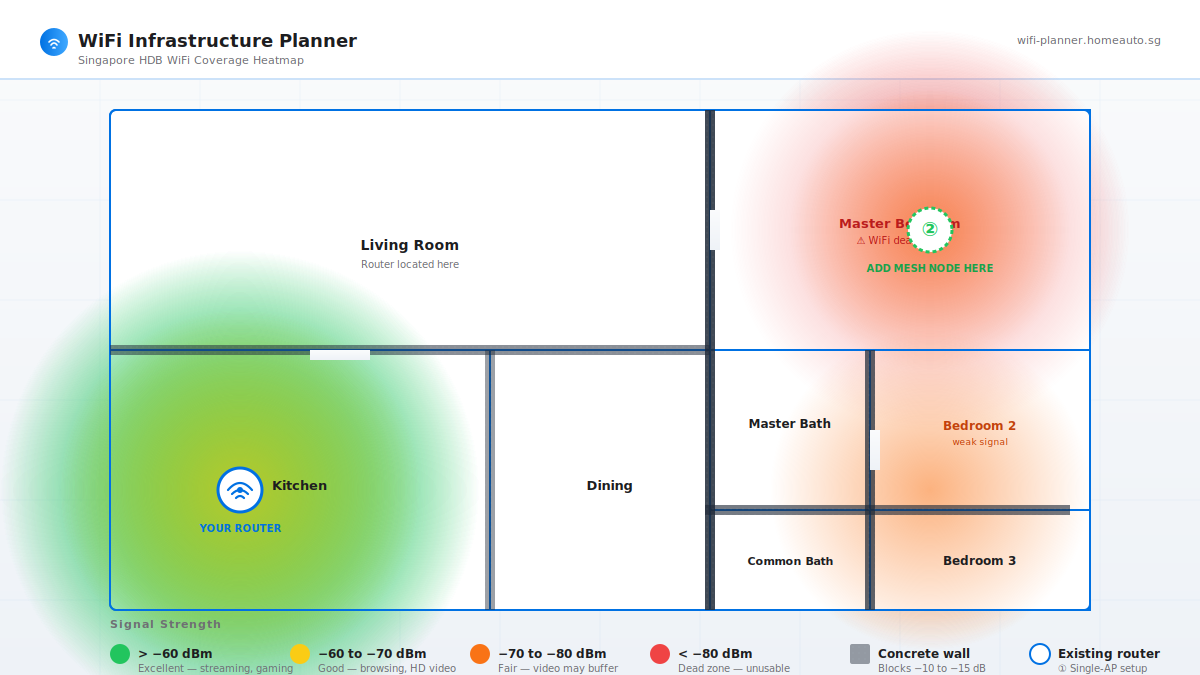
Each colour band on that heatmap corresponds to a real-world experience:
| Colour band | Signal strength | What you can actually do |
|---|---|---|
| Green (Excellent) | better than −60 dBm | Stream 4K, game, video call — no buffering |
| Yellow (Good) | −60 to −70 dBm | HD streaming, normal browsing — fine for daily use |
| Orange (Fair) | −70 to −80 dBm | SD video, basic browsing — buffering on YouTube |
| Red (Dead zone) | worse than −80 dBm | Calls drop, pages fail to load, WiFi shows "connected" but does nothing |
If your master bedroom is in the red zone, your phone is technically "connected" to WiFi — but the actual data rate is so low the radio falls back to 2.4 GHz at the lowest modulation, and your video call sounds like a ransom-note fax machine.
The fix: one mesh node in the right place
You don't need to re-wire your flat. You don't need to throw out your existing router. You need one additional access point — placed correctly — and your HDB becomes a fully-covered mesh network.
The heatmap above shows exactly where that second AP should go: at the far end of the house, in the master bedroom (marked ② on the image). When you add a mesh node there:
- The master bedroom goes from red to green
- Bedroom 2 and the common bath move from orange to yellow
- Your existing router and the new node now talk to each other on a dedicated 5 GHz backhaul channel
- You get seamless roaming — your phone switches between them as you walk around the flat
For most HDBs, one additional node is enough. Landed properties and larger condos might need two or three, but for a 4- or 5-room HDB? One is the sweet spot.
What mesh hardware actually works in Singapore (2026)
Based on the WiFi-Planner hardware database, here are the three picks that consistently perform best in HDB-sized deployments:
| Hardware | Pack / Pricing | Best for |
|---|---|---|
| TP-Link Deco X50 | 2-pack, around S$229 | Best price-to-performance for most HDBs. App setup takes about 10 minutes. |
| ASUS ZenWiFi AX (XT8) | 2-pack, around S$499 | Higher throughput, dedicated backhaul radio, better for working-from-home setups. |
| Ubiquiti UniFi U6 Mesh | Per node, around S$259 | Pro-grade, only for users comfortable configuring a UniFi controller. |
All three are available at Challenger, Harvey Norman, and on Shopee and Lazada with current Singapore retail prices. The WiFi-Planner tool pulls live SGD pricing so you don't have to shop around.
Run your own heatmap in 30 seconds
Don't trust our example floor plan — yours is different. The WiFi Infrastructure Planner tool at wifi-planner.homeauto.sg lets you:
- Draw your floor plan (or upload an HDB floor plan image)
- Mark where your router is
- Pick the room materials (HDB default = concrete walls)
- Get an instant heatmap
- See hardware recommendations with Singapore pricing
No sign-up. No credit card. The tool is free, recommendations are independent, and hardware picks include current Singapore retail prices.
Once you know where to put the node — how do you set it up?
Adding the access point is only half the job. You'll need to:
- Configure the mesh node's placement so the backhaul has line-of-sight to your main router
- Set up a guest network so your friend's phone doesn't see your NAS
- Choose the right channel (1, 6, or 11 for 2.4 GHz — never "auto")
- Decide whether to enable band steering (yes, for most homes)
We've put together a step-by-step DIY guide that walks through the actual app setup for TP-Link Deco, ASUS ZenWiFi, and Netgear Orbi — including screenshots and the exact settings that work in Singapore HDBs. Read the DIY WiFi Setup Guide for Singapore Homes before you start — it'll save you the 90 minutes of troubleshooting we went through.
And if you'd rather have someone handle the whole thing — heatmap survey, hardware purchase, installation, and verification — the WiFi Infrastructure Planner also offers on-site WiFi installation across Singapore. Book through WhatsApp, get a fixed quote, and the installer brings a WiFi analyser to verify every room hits at least −65 dBm before they leave.
The 30-second summary
- Your HDB WiFi isn't broken. It's fighting concrete walls and a bad layout.
- One mesh node in the right place fixes 90% of dead zones in a typical HDB.
- Free AI heatmap tool at wifi-planner.homeauto.sg tells you exactly where to put it.
- Setup takes around 10 minutes with the apps from TP-Link, ASUS, or Ubiquiti.
- Don't pay for "WiFi boosters." Half the price of a real mesh node, a third of the result.
Stop blaming your router. Run the heatmap. Fix it once.
Frequently asked questions
Why does my HDB WiFi work in the living room but not the bedroom?
Two reasons. First, HDB walls are concrete and reinforced steel — each concrete wall attenuates WiFi signal by 10–15 dB, and your master bedroom is typically two walls away from the router. Second, the fibre termination point sits in the living room, which means the router broadcasts in a circle and the bedroom is always on the wrong side of that circle. The result: a WiFi dead zone in the master bedroom even though everything looks fine in the living room.
Will a WiFi booster fix my HDB dead zone?
No. WiFi boosters (also called range extenders) repeat the signal from your existing router, but they cut throughput by at least 50% and still suffer the same wall attenuation. A mesh node is the correct fix — it talks to your main router on a dedicated backhaul channel, and your devices roam seamlessly between them.
How much does it cost to fix HDB WiFi dead zones in Singapore?
For most HDBs, a TP-Link Deco X50 2-pack costs around S$229 at Challenger, Shopee, or Lazada. ASUS ZenWiFi AX (XT8) 2-pack runs around S$499 for higher throughput. Ubiquiti UniFi U6 Mesh is around S$259 per node if you want pro-grade gear.
Where should I put my mesh node in an HDB?
In the master bedroom — the room farthest from the router. The free WiFi Infrastructure Planner at wifi-planner.homeauto.sg generates a heatmap of your specific HDB floor plan and shows exactly where the second access point should go.
Is the WiFi heatmap tool at wifi-planner.homeauto.sg really free?
Yes. No sign-up, no credit card. You draw or upload your HDB floor plan, mark where the router is, set the wall materials, and the tool generates an instant heatmap plus Singapore-priced hardware recommendations for TP-Link, ASUS, and Ubiquiti mesh gear.
Plan your HDB WiFi in 30 seconds
Free, no signup. Upload your floor plan, see exactly where to place your mesh node, and get Singapore-priced hardware recommendations for TP-Link, ASUS, and Ubiquiti.
Want HomeAuto to install the mesh node? WhatsApp +65 8807 7147.